TLS 패킷 중 ClientHello의 SNI/ALPN 확인하여 라우팅 할 필요가 있다.
문제는 이게 들어오면 그냥 그대로 보내면 되는게 아니라,
해당 SNI에 따라 SSH Tunnel을 열고난 후, 거기로 포워딩을 하려 하기에 복잡해진다.
그래서 Nginx NJS 모듈을 사용해서 복잡도를 좀 낮춰보기위해서 시도해보았다.
TLS ClientHello 메시지를 파싱해서 SNI/ALPN등을 확인하고 그에 맞춰서 작업을 처리해주고,
그다음에 proxy_pass를 하는식으로 할 계획이다.
nginx.conf 다른거 다 쳐내고 중요한 내용만 남겼다.
# NJS 모듈 로드
load_module modules/ngx_stream_js_module.so;

stream {
    # JS file path
    js_path "/etc/nginx/njs/";
    # import stream.js and name it as "main"
    js_import main from stream.js;

    # ssl_preread doesn't work with NJS i think
    # ssl_preread on;

    server {
            listen 443;

            # JS Preread
            js_preread main.hello;

            proxy_pass 127.0.0.1:22;
    }
}
JS 코드는 간단하게 이렇게 작성했다.
Client Hello 데이터 받으면 s.warn으로 로그 찍어주는것만 해놨다.
// stream.js

/// <reference path="../ts/ngx_stream_js_module.d.ts" />
/**
 * @param {NginxStreamRequest} s
 * */
function hello(s) {
    s.on('upload', function (data, flags) {
        s.warn('upload');
        s.warn(data);

        // dbg purpose
        Object.keys(s).forEach(function (key) {
            s.warn(key + ': ' + s.variables[key]);
        });
    });
}

export default {hello}
ssl_preread on; 을 하면 난 아래 variable에 있는 ssl_preread_alpn_protocols, ssl_preread_server_name 이 설정 될 줄 알았는데, 인생은 그리 쉽지 않다.
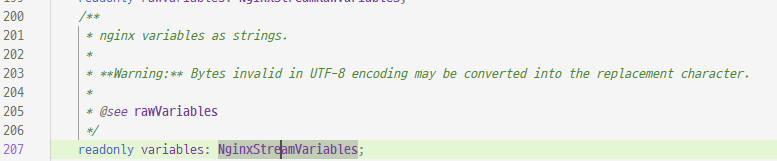

문서를 보니 아래외 같이 적혀있다.
http://nginx.org/en/docs/njs/reference.html#stream
s.variables{}
nginx variables object, writable (since 0.2.8). A variable can be writable only if it is referenced in nginx configuration file. Even so, some embedded variables still cannot be assigned a value.
Writable only 인데, 이거에 쓰려면 conf에서 사용중이여야만 한다는 뜻.
아무래도 JS에서 Client Hello 파싱하고 여기다 write 한 후, conf에서 쓰는 것 같다.
예제를 봐도, 직접 파싱하고 처리하는 듯 허다.
function preread(s) {
    s.on('upload', function (data, flags) {
        var n = data.indexOf('\n');
        if (n != -1) {
            line = data.substr(0, n);
            s.done();
        }
    });
}
http://nginx.org/en/docs/stream/ngx_stream_js_module.html#properties
Module ngx_stream_js_module
Module ngx_stream_js_module The ngx_stream_js_module module is used to implement handlers in njs — a subset of the JavaScript language. Download and install instructions are available here. Example Configuration The example works since 0.4.0. stream { j
nginx.org
아무튼 이런 방법도 있는데, 있다는 것만 기억해두고
파이썬으로 돌아가서 작업할 듯 하다.
'공부 > Network' 카테고리의 다른 글
| ARP(Address Resolution Protocol) (0) | 2022.06.18 |
|---|