이곳의 설명과 사진을 참조했습니다.
http://www.sharetechnote.com/html/IP_Network_ARP.html
ShareTechnote
Even though we specify the source and destination of a packet in the form of IP address, when the packets move along the physical infrastructure of a network, it just jumps from one node to another neghbouring node using link layer address (MAC address), n
www.sharetechnote.com
패킷 구조

- Hardware type (HTYPE)
- 네트워크 링크 프로토콜 타입 - 이더넷은 1이라고 한다.
- Protocol type (PTYPE)
- 프로토콜 타입 (For IPv4, this has the value0x0800) - ARP는 0x0806이라고 나와있던데 뭐지?
https://en.wikipedia.org/wiki/Address_Resolution_Protocol.
Address Resolution Protocol - Wikipedia
From Wikipedia, the free encyclopedia Jump to navigation Jump to search Protocol used for discovering network layer addresses The Address Resolution Protocol (ARP) is a communication protocol used for discovering the link layer address, such as a MAC addre
en.wikipedia.org
상황 가정
IP packet을 만들어 전송하기 위해서는 Network Interface Layer에 해당하는
이더넷 프레임을 만들어야하는데, 이때 전송 목적지 장치의 MAC 주소를 알아야 한다.
근데 그걸 모를 때 사용하는 것이 ARP(Address Resolution Protocol)
* IPv6 네트워크에선 ARP 기능이 NDP(Neighbor Discovery Protocol)를 통해서 제공된다 한다.
내 장치가 192.168.1.13이고, MAC 주소가 68:5d:43:8b:f9:de 일 때
192.168.1.1에 할당된 기기의 MAC 주소를 알고 싶다.
요청(192.168.1.13 -> 192.168.1.1)
Destination: ff:ff:ff:ff:ff:ff (알아내고자 하는 장치의 MAC 주소를 모르기에, 전체 네트워크에 Broadcast)
Destiantion IP: 192.168.1.1
Source: 68:5d:43:8b:f9:de (내 장치 맥 주소)
Source IP: 192.168.1.13 (내 장치 IP 주소)

응답(192.168.1.1 -> 192.168.1.13)
Source: 18:59:33:f4:49:1f (알아내고자 한 장치)
Source IP: 192.168.1.1
Destination: 68:5d:43:8b:f9:de (내 장치 맥 주소)
Destiantion IP: 192.168.1.13 (내 장치 IP 주소)
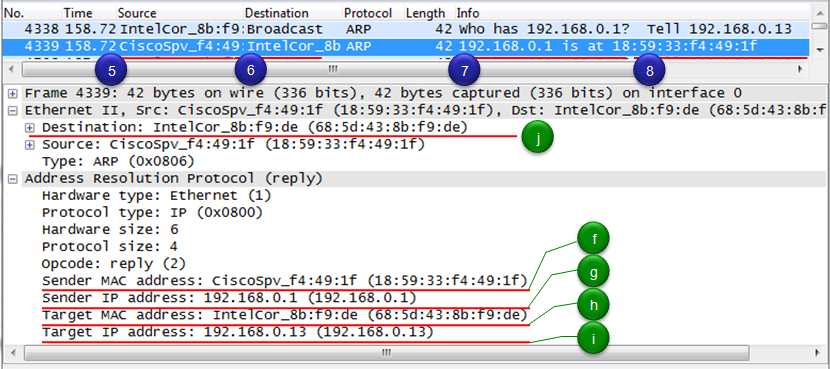
매번 이런 식으로 요청하면 통신 overhead가 너무 커지기 때문에
이 정보를 ARP Cache에 저장해 두고 있다가 꺼내 쓴다고 한다.
그럼 WAN에서는 이걸 어찌 할까?
나모 몰?루

공부해보고 적어보려고 한다.
'공부 > Network' 카테고리의 다른 글
| NGINX NJS(Javasciprt) 모듈 SNI/APLN Parsing(ssl_preread) (0) | 2022.10.27 |
|---|